Help center
Step-by-step guides, answers to common questions, and a way to reach a person.
Step-by-step guides
Steps with real screenshots of our website, and simple drawings for wallet and exchange screens. Some guides have a short video too.
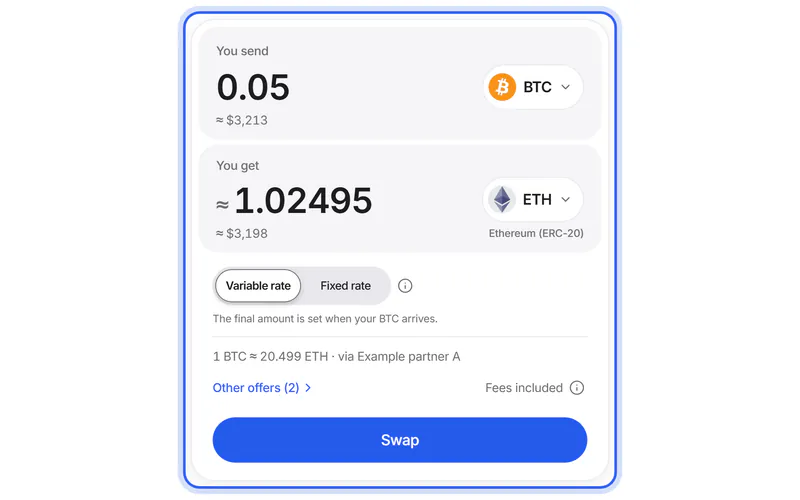
Make your first swap
8 stepsVideo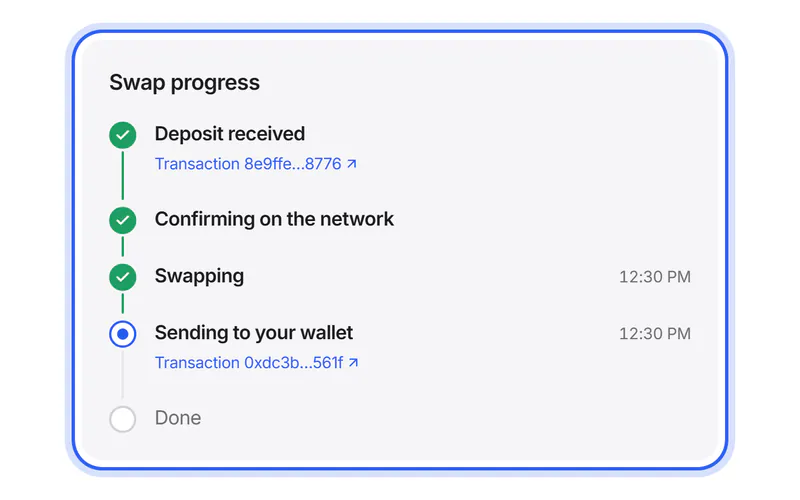
Track your swap
6 steps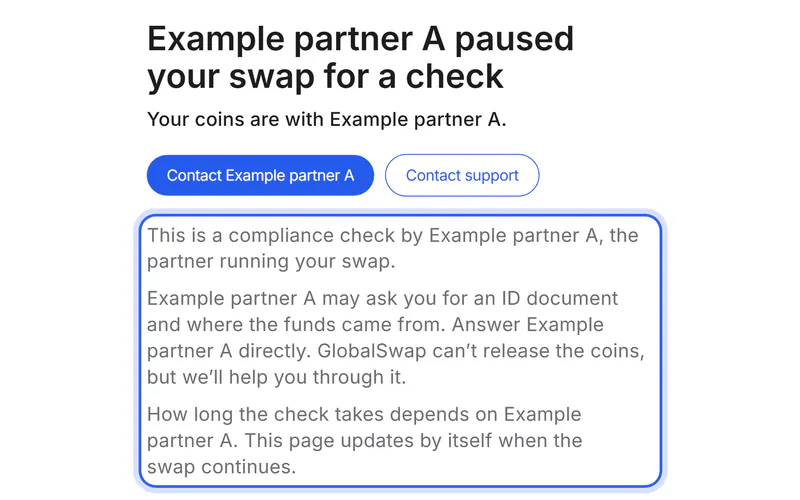
If something goes wrong
4 steps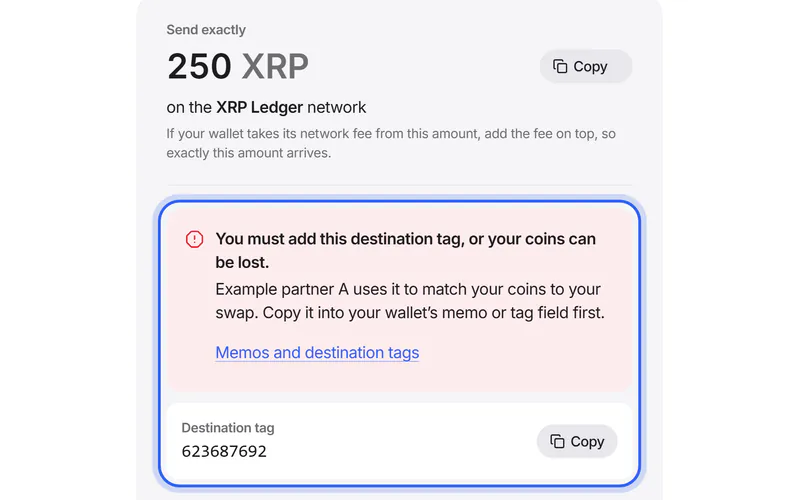
Memos and destination tags
5 steps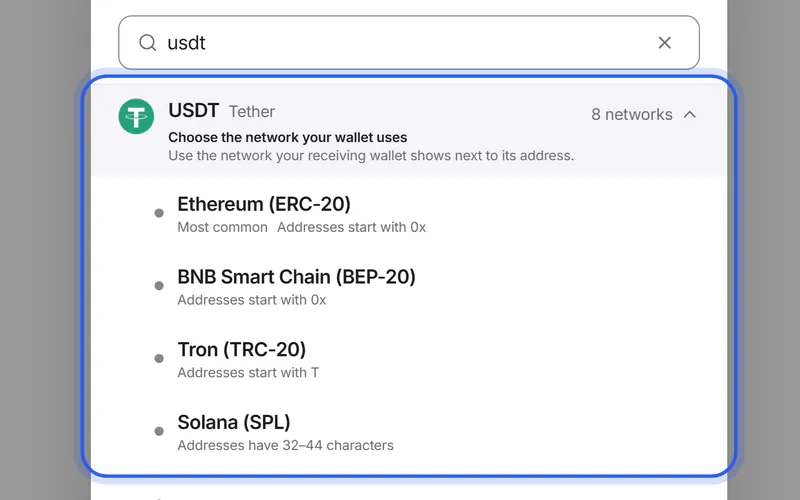
Choose the right network
4 steps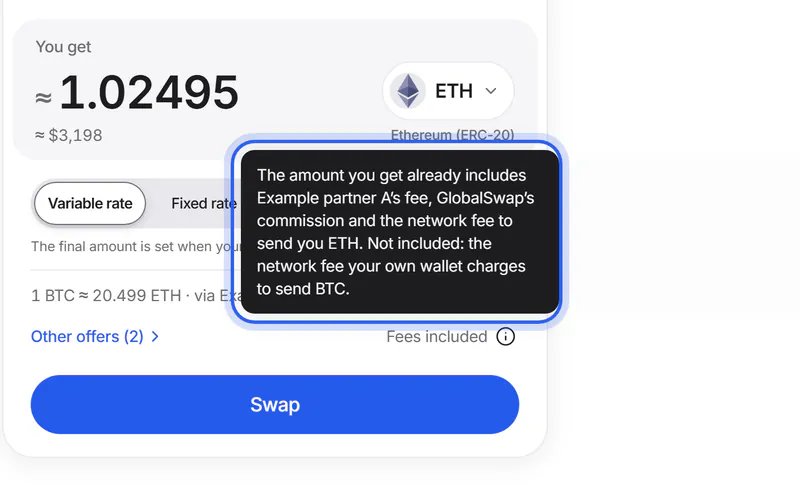
Fees explained
4 steps
All guides21
- Make your first swap8 steps
- Choose the right network4 steps
- USDT TRC20 vs ERC20: what's the difference?5 steps
- Move USDT from TRC20 to ERC206 steps
- Find your wallet address4 steps
- Memos and destination tags5 steps
- Variable or fixed rate?3 steps
- Send your coins6 steps
- Send from an exchange account5 steps
- Track your swap6 steps
- Lost your tracking link3 steps
- If something goes wrong4 steps
- If your swap is paused for a check4 steps
- If you sent the wrong amount or too late4 steps
- USDT sent on the wrong network — what now?6 steps
- XRP sent without the destination tag — what now?5 steps
- Get a refund4 steps
- Contact support4 steps
- Fees explained4 steps
- How we compare offers and how we earn4 steps
- Stay safe5 steps
Browse by topic
- Getting startedHow a swap works, from choosing coins to receiving them.5 questions
- Networks & walletsPick the right network, find your address and add a memo.4 questions
- Sending & receivingSend the exact amount in time, from a wallet or an exchange account.3 questions
- TrackingFollow your swap step by step and find it again.4 questions
- Problems & refundsPauses, wrong amounts, refunds, and how to reach us.5 questions
- FeesWhat's already taken out of the amount, and variable or fixed rates.3 questions
- Security & privacyProtect your coins, spot scams and see what we store.3 questions
Questions? Answers.
Short answers to common questions.
Getting started
How a swap works, from choosing coins to receiving them.
How does a swap work?
Choose the coin you send and the coin you want. We ask our partner exchanges for offers and show you the one that gives you the most coins; you can compare the others.
Then you enter the address of your wallet, create the swap and send your coins to the address the partner gives you. The partner swaps them and sends the new coins straight to your wallet. Your swap's page shows every step until they are sent.
Do I need an account or verification?
You don't need an account with GlobalSwap. You only enter the address that receives your new coins and, if you like, a refund address.
The partner that carries out your swap may pause it and ask for identity verification, for example if its checks flag a transaction. Some partners ask everyone who lives in certain countries, including EU countries. Each partner's policy is linked on the Partners page.
Who carries out my swap?
The partner exchange you choose. Every offer names its partner, and the Partners page lists all of them with their terms. The partner receives your coins, swaps them and sends the new coins to your wallet.
Some partners compare exchanges themselves. Then one of their exchanges runs the swap, and your swap's page names it when the partner tells us.
GlobalSwap compares the offers, creates the swap with the partner for you, shows its progress and helps if something goes wrong. We never hold your coins.
Which coins can I swap?
Every coin and network that at least one active partner supports and that we can check safely. The list on the Coins page comes from the partners and changes when they add or remove coins.
Tokens such as USDT exist on several networks, so each coin is listed with its networks.
Can I cancel a swap?
Before you send coins, yes: simply don't send anything. The swap closes by itself.
Once your coins are sent, the transaction can't be reversed. If you want them back, send us a support request with your swap ID: we help you ask the partner. The partner decides whether it can refund you.
Networks & wallets
Pick the right network, find your address and add a memo.
Which address do I enter?
The address of the wallet or exchange account that should receive your new coins. It must be for the coin and the network you chose, for example USDT on Tron (TRC-20).
Copy it from your wallet's Receive screen. We check its format and warn you if it looks like an address on another network.
What is a network, and why does it matter?
A network is the system a coin travels on, also called a blockchain. Some coins exist on several networks: USDT, for example, runs on Ethereum, Tron and others.
Your wallet address and your swap must use the same network. Coins sent on another network may not arrive, and they can be hard or impossible to recover.
What is a memo or destination tag?
Some networks, such as XRP, Stellar, TON and Cosmos, use an extra number or text together with the address. Exchanges use it to know which customer the coins belong to.
If your exchange shows a memo, tag or comment with your address, add it on the Swap details page. When you send, add the memo shown on the Send screen. Without it, coins can be delayed or lost.
Can I receive the new coins in an exchange account?
Yes, if the exchange supports the coin on that network. Use the address the exchange shows for deposits and, if it shows one, its memo or tag.
After the partner has sent your coins, your exchange may need some time before it credits them to your account.
Sending & receiving
Send the exact amount in time, from a wallet or an exchange account.
How long does a swap take?
Your swap starts when your deposit is confirmed. That usually takes under a minute on Solana, 1–5 minutes on Tron, 2–10 minutes on Ethereum and 20–60 minutes on Bitcoin, sometimes longer.
Then the partner swaps your coins and sends the new ones, which usually takes a few minutes. Your wallet shows them once the receiving network confirms them too: on Bitcoin, that can take another 20–60 minutes.
Why is there a minimum amount?
Every swap pays a network fee to send you the new coins, and partners have their own costs. Below a certain amount, these would take most of it, so partners set a minimum for each pair of coins.
If your amount is below the minimum, the swap card says so under the amount, with a button to use it. Large amounts can hit a maximum, which the card shows the same way.
How long do I have to send my coins?
That depends on the partner and the rate type. A fixed rate holds only for a short time; when the partner tells us its time limit, the Send screen counts it down. For a variable rate you usually have more time.
If the time has run out and you haven't sent anything, don't send: start a new swap. If your coins arrive late, the partner's terms decide what happens: it usually swaps them at the current rate or offers a refund.
Tracking
Follow your swap step by step and find it again.
How do I follow my swap?
Open your tracking link. The page shows each step with its time, from your deposit until your new coins are sent. When the partner reports them, it also links to the transactions.
In the browser you used to create the swap, the Track page also lists it under “Swaps on this device”.
Why does my tracking link contain a long code?
The code keeps your swap private. Only someone with the full link can see its details; the swap ID alone isn't enough.
Keep the link private and don't post it publicly. It works until we delete the swap, 7 days after it ends.
I lost my tracking link. What can I do?
In the browser you used to create the swap, open Track: your swap is listed under “Swaps on this device”. A different browser, a private window or cleared browsing data won't show it.
Otherwise, send a support request with your swap ID or the transaction ID of your deposit, and we'll help you find your swap.
What is a transaction ID?
It's the public reference of a transfer on a network, also called a transaction hash or TXID. Your wallet shows it after you send.
With it, anyone can look up the transfer on a block explorer, a public website that shows every transaction on a network. Our support can check your deposit with it too.
Problems & refunds
Pauses, wrong amounts, refunds, and how to reach us.
What if I sent the wrong amount or used the wrong network?
A different amount: don't send the difference. Your swap's page shows what arrived and what happens next. The partner's terms decide: it usually swaps what arrived at the current rate or offers a refund.
The wrong network: don't send more. Send us a support request with your swap ID, the transaction ID and the network you used. Some of these deposits can be recovered, but not all, and recovery can cost a fee.
Why was my swap paused for a check?
Partners check some transactions under their anti-money-laundering policies. If a swap is flagged, the partner pauses it and may ask for an ID document and where the funds came from.
Your coins stay with the partner during the check, and only the partner can release the swap. Your swap's page links to the partner's page, and our support helps you through it.
How long a check takes depends on the partner and on how fast you answer. If you can't or don't want to verify, ask the partner what happens to your coins; its policy is linked on the Partners page.
My swap is taking longer than usual. What should I do?
Most delays come from the network. Open the transaction in your wallet or on a block explorer, a public website that shows every transaction on a network.
Is your deposit confirmed there, and does your swap's page say “Taking longer than usual”? Then send a support request with your swap ID and the transaction ID.
How do refunds work, and who pays the network fee?
Refunds come from the partner, never from GlobalSwap, under the partner's own terms. They usually go to the refund address you entered or, without one, to the address you sent from. That's why we recommend adding a refund address.
Until then, your coins stay with the partner. A refund can cost fees, such as the network fee for sending it back or a partner's service fee; the partner's terms say which. Once the refund is sent, your swap's page shows its transaction.
Sent from an exchange account without a refund address? Send us a support request with your swap ID: we help you ask the partner.
When should I contact support?
Contact us if your deposit is confirmed but your swap doesn't move. Also contact us if you sent the wrong amount, coin or network. The same goes when a partner asks for something you don't understand, or when your swap's page doesn't update.
Add your swap ID and the transaction ID. We never ask for your seed phrase or private key.
Fees
What's already taken out of the amount, and variable or fixed rates.
What does it cost?
The cost is built into the rate, so there is no separate bill. The amount under “You get” is what you receive after the partner's fee, our commission and the network fee for sending you the new coins.
Not included: the network fee your own wallet charges when you send. With a variable rate, the amount is an estimate until your coins arrive. To compare costs, compare what you get.
Variable or fixed rate: what's the difference?
Variable: you get about the amount shown. The final amount is set when your coins arrive, and you usually have more time to send.
Fixed: you get exactly the amount shown if you send the exact amount and it arrives within the partner's time limit. It usually costs a little more. Sending from an exchange account? Choose variable.
How does GlobalSwap earn money?
We earn a commission on each swap. It is part of the rate: the partner pays it to us, and it is already taken out of the amount you see. Nothing is added on top.
Offers are sorted only by what you get, and no partner pays to be placed higher.
Security & privacy
Protect your coins, spot scams and see what we store.
Is my money safe with GlobalSwap?
GlobalSwap never holds your coins. While your swap runs, your coins are with the partner you chose, which sends the new coins straight to your wallet. A partner can pause a swap for a check; each partner's terms are on the Partners page.
What you control matters most: check the address, the network and any memo before you create a swap. Keep your seed phrase to yourself: nobody from GlobalSwap will ask for it.
What data do you store, and for how long?
For each swap: the coins, amounts, partner, status and the addresses you entered. We delete swaps 7 days after they end, and open ones after 30 days at the latest. We keep a swap longer only if we need it to meet a legal duty or for a legal claim.
Our database doesn't store your IP address in readable form, only a scrambled version (a hash) made with a secret key. We keep it for one to two days against abuse, and for 90 days in our security log when you create a swap. The privacy policy has the details.
Will anyone from GlobalSwap ask for my seed phrase?
No. Nobody from GlobalSwap needs your seed phrase (the secret words that unlock your wallet), private key, passwords, two-factor codes or access to your device. No real exchange needs your seed phrase or private key either.
If someone asks, it's a scam. Stop the conversation and tell us in a support request.
Still need help?
Ask the help assistant, or send a support request. We reply on the request's own page.
Or email us at support@globalswap.io.
We never ask for your seed phrase, private key or remote access to your device.